

New integration
The Arduino MKR 1010 WiFi, now on Thinger.io
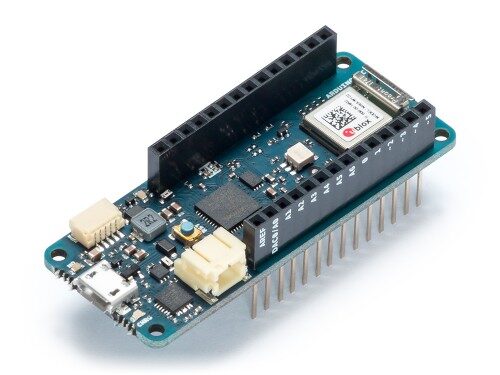
The developer and maker environment has just taken a great leap thanks to the presentation of the new Arduino MKR 1010 WiFi. More and more often, companies use these kinds of devices to create their first MVPs, as they are really easy to use and allow a fast deployment.
That's why we just updated our Thinger.io library. Now it is easier than ever to connect your Arduino MKR 1010 WiFi to the Thinger.io server.
The board
An ESP32 module on the MKR form factor
The Arduino MKR 1010 WiFi is the newest version of the Arduino MKR 1000 WiFi, and it has an ESP32 module. This speeds up and simplifies the prototyping of WiFi-based IoT applications.
It is possible to connect it to other expansion shields, and it has the same pinout as other MKR boards (1400-1000). The MKR 1010 allows making digital and analog reads, as well as reads from sensors of all kinds such as the DHT11 or the Dallas 18B20. It also controls the GPIO status through DigitalWrite or AnalogWrite.

The MKR WiFi 1010 includes 32-bit computational power, the usual rich set of I/O interfaces, and low power Wi-Fi with a Cryptochip for secure communication using SHA-256 encryption. It has a USB port to supply power (5V) to the board, and a Li-Po charging circuit that allows it to run on battery power or an external 5-volt source, charging the Li-Po battery while running on external power.
Arduino MKR 1010 WiFi at a glance
- Wireless module
- ESP32, low power Wi-Fi
- Computation
- 32-bit computational power
- Secure communication
- Cryptochip, SHA-256 encryption
- Pinout
- Same as other MKR boards (1400-1000), expansion shields supported
- Power
- USB port (5V), or a Li-Po battery or an external 5-volt source
- Li-Po charging
- Charges the battery while running on external power
- Reads
- DigitalAnalogDHT11Dallas 18B20
- GPIO control
- DigitalWriteAnalogWrite
Example code
Connect the board with the library example
The library ships an example for the board. To open it in the Arduino IDE, go to File > Examples > thinger.io > Arduino > Arduino WiFi 1010.ino.
And this is the example code. Fill in your user name, device ID and device credential, and the SSID and password of your WiFi network:
#include <ThingerWiFiNINA.h>

#define USERNAME "your_user_name"
#define DEVICE_ID "your_device_id"
#define DEVICE_CREDENTIAL "your_device_credential"

#define SSID "your_wifi_ssid"
#define SSID_PASSWORD "your_wifi_ssid_password"

ThingerWiFiNINA thing(USERNAME, DEVICE_ID, DEVICE_CREDENTIAL);

void setup() {
  // configure wifi network
  thing.add_wifi(SSID, SSID_PASSWORD);

  pinMode(LED_BUILTIN, OUTPUT);

  // pin control example (i.e. turning on/off a light, a relay, etc)
  thing["led"] << digitalPin(LED_BUILTIN);

  // resource output example (i.e. reading a sensor value, a variable, etc)
  thing["millis"] >> outputValue(millis());

  // more details at http://docs.thinger.io/arduino/
}

void loop() {
  thing.handle();
}
The sketch as the library shipped it in 2018. Examples have evolved since then: the current version of this one is in the Thinger.io Arduino Library repository. Today the library is one of the open-source clients on Device connectivity, and the protocol it speaks is IOTMP.
Your projects
Show us what you build with the MKR 1010
We would love to see your projects using the Arduino MKR 1010 WiFi, so be sure to share them in the Community Discussion Forum.
Share your MKR 1010 project
Questions, sketches and finished projects: the team and other makers answer on the forum.


