
Data buckets
Three new features for data buckets
Some days ago we released some new features on data buckets that we want to share with you. Here they come.
Bucket explorer
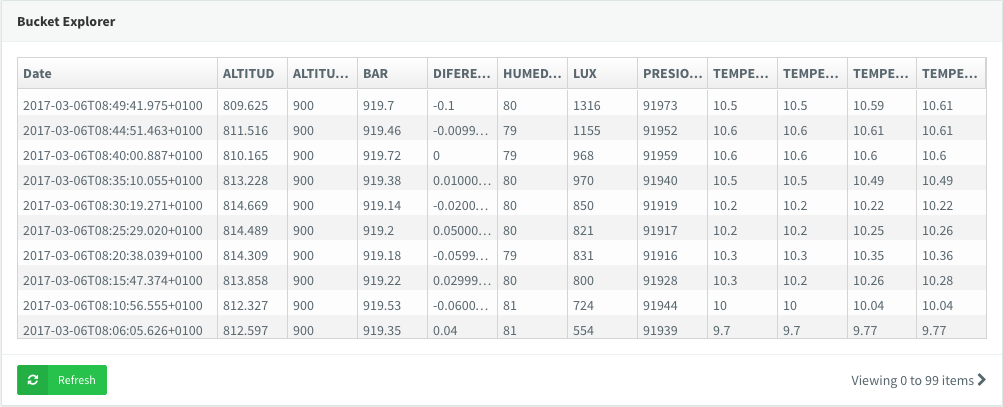
Show tabular data in the bucket explorer
The data bucket explorer can now display a bucket in a tabular format.
The table lets you review the information in a more comprehensive way than the raw JSON value, with one column per value and one row per entry.

Clearing
Clear a bucket in full or in part
Sometimes it is useful to clear the information of a bucket without deleting the whole bucket and then creating and configuring it again.
Now you can clear the whole bucket, or just a part of it, from the bucket page. While the data is being cleared, the bucket can still record information from your device.

Write call
A data bucket write function for battery-powered devices
A new function in the Arduino library and the server supports writing to a bucket as required: a great addition for battery-powered devices that record to a data bucket.
Suppose you have a NodeMCU, a Wemos or an ESP8266 recording temperature and humidity periodically. You need a resource that defines the device output and just provides the temperature and humidity from the sensor (a DHT in this case). With the resource defined, the loop only has to:
Handle the connection
Write to the bucket
Sleep
void setup() {
  // define the resource with temperature and humidity
  thing["TempHum"] >> [](pson& out){
    out["temperature"] = dht.readTemperature();
    out["humidity"] = dht.readHumidity();
  };
}

void loop() {
  // handle connection
  thing.handle();
  // write to bucket BucketId
  thing.write_bucket("BucketId", "TempHum");
  // sleep the device SLEEP_MS milliseconds
  ESP.deepSleep(SLEEP_MS*1000, WAKE_RF_DEFAULT);
}
You can also write to a data bucket from a pson value directly, without defining a resource:
void loop() {
  // handle connection
  thing.handle();
  pson data;
  data["temperature"] = dht.readTemperature();
  data["humidity"] = dht.readHumidity();
  thing.write_bucket("BucketId", data);
  ESP.deepSleep(SLEEP_MS*1000, WAKE_RF_DEFAULT);
}
Update, 2026: the console now labels this source “From device Write Call”, and a bucket in this mode can store data written by several devices.


